

This Week's SMB Risk Signals: SharePoint Trust, Renewal Law, and AI Presence
The workflows that can act for you now need clearer consent, containment, and approval.

On July 16, 2026, CISA updated its SharePoint exploitation alert after adding CVE-2026-58644 to the Known Exploited Vulnerabilities catalog, warning that active exploitation of multiple on-premises SharePoint flaws can lead to remote code execution, stolen IIS machine keys, persistence, and malware deployment. On July 22, 2026, New York Attorney General Letitia James secured a $375,000 settlement from 1-800-Flowers after investigators found deceptive automatic subscription renewals, inadequate acknowledgments, and missing renewal notice controls. Also on July 22, 2026, OpenAI introduced Presence, a product for deploying enterprise AI agents with policies, guardrails, approved actions, and human escalation rules.
These are not three unrelated headlines. They are one operating problem. The workflows that can execute for you, charge for you, or act for you now need clearer consent, containment, and approval boundaries. If a collaboration server can quietly become an execution surface, if a renewal engine can bill customers without clear notice, or if an AI agent can touch systems before your policies are mature, trust is still outrunning control
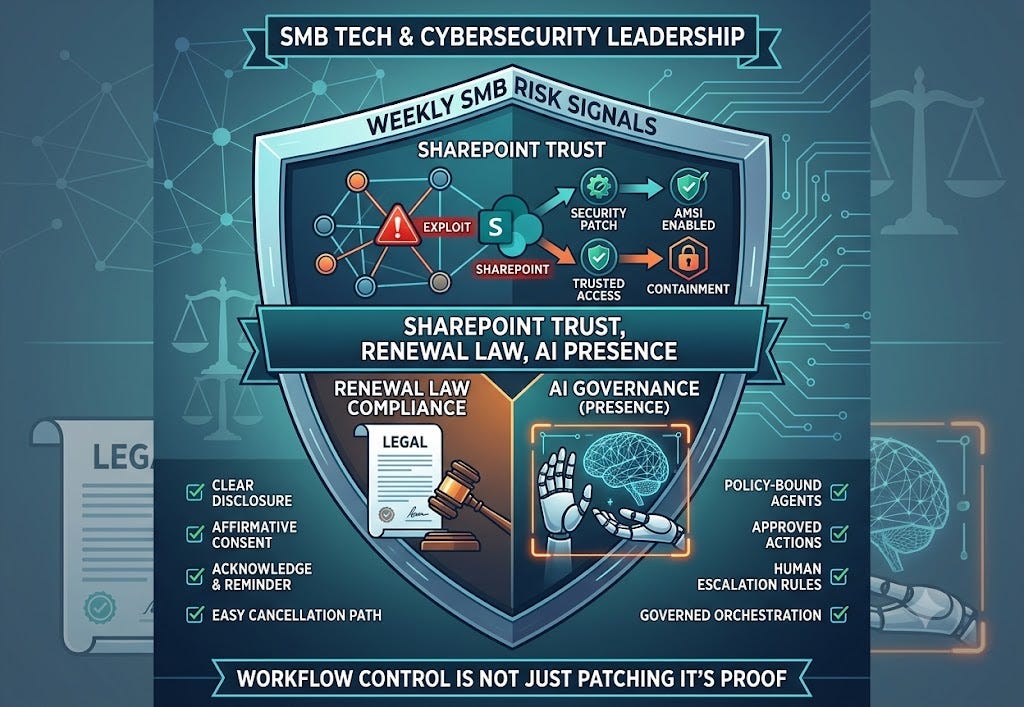
The SharePoint story matters because it is not about a fringe system. It is about a platform many organizations still treat as a quiet internal utility even though it can hold documents, workflows, service accounts, and administrative leverage. CISA said active exploitation affects all supported on-premises SharePoint Server versions: Subscription Edition, 2019, and 2016.
Why You Should Be Concerned:
This is already active exploitation: CISA said threat actors are exploiting CVE-2026-32201, CVE-2026-45659, CVE-2026-56164, and CVE-2026-58644, not merely scanning for them.
Post-exploitation risk is broader than patching: The alert says the activity includes stealing IIS machine keys and using deserialization techniques to gain persistence and deploy malware.
The hardening advice is specific: CISA urged organizations to apply patches, enable AMSI with Full Mode where feasible, hunt for intrusion artifacts before rotating machine keys, and avoid exposing SharePoint directly to the internet unless it sits behind an authenticated Layer 7 reverse proxy.
Strategic Action: Treat on-premises collaboration servers as privileged execution surfaces. If your team cannot say whether any SharePoint server is still externally reachable, whether AMSI is fully enabled, or who owns the service-account and machine-key response plan, your containment story is still incomplete.
This Week’s Leadership Move:
Confirm whether any supported SharePoint Server instance is still running on-premises, and whether it is exposed directly or indirectly to the internet.
Verify that Microsoft’s latest security updates installed cleanly and that AMSI integration is enabled for each SharePoint web application.
Hunt for webshells, suspicious worker-process activity, and machine-key access before rotating secrets or restarting services.
To keep SharePoint, IIS, and emergency admin credentials from turning into shared blind spots, 1Password gives teams a cleaner way to separate privileged access, rotate secrets, and prove who still has the keys.
Affiliate sponsor
2. Auto-Renewal Compliance Is Now an Operating-Control Problem
The 1-800-Flowers settlement is useful because it turns recurring billing into a concrete legal and process-control issue for every SMB that sells subscriptions, retainers, support plans, training, or membership-style services. New York’s attorney general said the company failed to clearly disclose subscription terms, failed to provide the acknowledgment required by New York law, and did not notify subscribers before the subscription renewed automatically.
Why You Should Be Concerned:
The control failures were basic, not exotic: The public settlement says terms were buried in fine print, linked terms, or pop-out boxes many consumers never opened.
Consent and proof both mattered: New York law requires affirmative consent, a post-purchase acknowledgment, and an easy cancellation process, not just a checkout page that technically mentions renewal somewhere.
Recurring revenue can become recurring legal risk: If your team cannot prove who approved the wording, who owns the acknowledgment email or screen, and who validates reminder notice behavior, the renewal engine is acting on trust alone.
Strategic Action: Treat recurring-billing workflows like compliance controls, not just growth mechanics. The standard is no longer whether the checkout flow converts. It is whether you can clearly show consent, acknowledgment, reminder, and cancellation evidence when a complaint or regulator asks.
I know lean SMB teams often inherit billing plugins, SaaS plan logic, and lifecycle emails from several different owners. That is exactly why this issue matters. If no one owns the legal behavior of the renewal flow end to end, the business can keep charging long after the control story has broken.
This Week’s Leadership Move:
Review every auto-renewing offer and confirm the renewal term, cancellation policy, and renewal behavior appear clearly before payment.
Test whether the customer receives a usable post-purchase acknowledgment and a renewal reminder when the law or policy requires one.
Save one evidence packet this week: thIf you want the implementation pack, checklist, and exercise below, the subscribe prompt is the quickest path into the premium section.
You’ve seen the "Why" behind this [Cyber/Tech Issue]—but knowing the risk is only half the battle. To move from awareness to actual protection, you need a localized execution plan.
The remainder of this deep dive is designed specifically for the SMB leader who needs to move fast without a massive enterprise budget. By upgrading to a paid subscription, you unlock:
The “How-To” Framework: A step-by-step breakdown of the [Process/Tool] mentioned above.Paid subscribers this week get a trusted-workflow register, a SharePoint hardening checklist, a renewal-control review list, and an AI approval exercise.Premium Intelligence: The Trusted Workflow Control Pack
Welcome, premium subscribers. This section turns this week’s three public signals into an implementation pack for SMB leaders, MSP-backed teams, and operators managing too many inherited workflows. The goal is not more commentary. It is clearer control ownership, better evidence, and safer automation.
1. SharePoint Deep Dive: Hardening an Execution Surface
Technical Detail: CISA said active exploitation affects SharePoint Server Subscription Edition, 2019, and 2016 through CVE-2026-32201, CVE-2026-45659, CVE-2026-56164, and CVE-2026-58644. The agency said post-exploitation behavior includes stealing IIS machine keys and using deserialization techniques to gain persistence and deploy malware.
Patch discipline: Apply Microsoft’s latest updates and verify they completed successfully, not just that the maintenance window ran.
Detection discipline: Enable AMSI for each SharePoint web application and use Full Mode where feasible. Review telemetry for suspicious worker-process activity, anomalous requests, machine-key access, and webshell behavior.
Containment discipline: Hunt for intrusion artifacts before rotating machine keys or other secrets, or you risk restoring trust into a still-compromised environment.
Exposure discipline: Avoid direct internet exposure unless the server is behind an authenticated Layer 7 reverse proxy or equivalent application-layer control.
2. Renewal-Law Deep Dive: Consent, Acknowledgment, Notice
Technical Detail: The July 22 settlement says 1-800-Flowers failed to clearly disclose subscription terms, failed to provide the subscription acknowledgment required by New York law, and failed to notify subscribers before automatic renewal. The attorney general’s office also said New York law requires affirmative consent, a post-purchase acknowledgment, and an easy cancellation path.
Consent baseline: The renewal term, price, and cancellation path must be obvious before payment, not buried in links or secondary overlays.
Acknowledgment baseline: The business should be able to reproduce the post-purchase acknowledgment message or page and prove when it fired.
Notice baseline: Renewal reminders should be tested, timestamped, and owned by a specific operator or system owner.
Complaint baseline: If a customer says “I did not know this renewed,” your team should be able to show the pre-purchase view, acknowledgment, reminder, and cancellation route quickly.
3. Presence Deep Dive: Policies Before Scale
Technical Detail: OpenAI says Presence helps enterprises deploy trusted agents that can answer questions, resolve issues, use company systems, take approved actions, and escalate to people when needed. OpenAI says each deployment starts with a specific job and limited knowledge and system access, while the company decides what actions require approval and when a person should take over.
Workflow boundary: Separate agent use cases into retrieve-and-answer, draft-and-review, and permissioned execution. Do not let one approval model cover all three.
Access boundary: Write down exactly what documents, systems, and tools the workflow can touch. “Internal knowledge” is not specific enough.
Escalation boundary: Define the events that stop the workflow: uncertain identity, policy conflict, financial impact, legal terms, or access expansion.
Improvement boundary: Track accepted outcome rate, escalation rate, and remediation loop, not only usage growth.
AGENTS NEED EXPLICIT OPERATING BOUNDARIES
Presence makes it easier to imagine agents doing real work across company systems. That only increases the need for visible policy, approved actions, and human takeover rules.
Airia is a strong fit when you need governed AI orchestration, clearer policy boundaries, and better control over where agent workflows can and cannot act.
Put policy around production AI. Explore Airia
Affiliate sponsor
Premium Template: Trusted Workflow Approval Register
Use this register for any workflow or system that can execute, charge, or escalate on the company’s behalf.
Workflow or system name: The exact platform, automation, or operational flow.
What it can do: Charge a card, issue a response, change data, access documents, create a ticket, or change access.
Consent owner: Who owns the customer, employee, or internal authorization boundary.
Containment owner: Who owns patching, detection, logging, and stop conditions.
Approval owner: Who authorizes high-risk actions, overrides, or expanded access.
Evidence artifact: The screen, log, email, or report that proves the control worked.
Premium Checklist: SharePoint and Renewal Control Review
☐ Confirm whether any supported SharePoint Server remains on-premises and exposed beyond a tightly controlled path.
☐ Verify SharePoint patches installed successfully and AMSI is enabled for each web application.
☐ Hunt for suspicious worker-process activity and machine-key access before rotating secrets.
☐ Review one live recurring offer and confirm pre-purchase disclosure is clear and complete.
☐ Capture one post-purchase acknowledgment and one renewal reminder as evidence.
☐ Test one cancellation path and record how many steps it takes a customer to exit.
Premium Guide: Seven-Day Trusted Workflow Sprint
Day 1: List the workflows with agency
Inventory the systems that can execute, charge, approve, or escalate on behalf of the business.
Day 2: Name the three owners
For each workflow, assign the consent owner, containment owner, and approval owner.
Day 3: Verify the containment layer
Check patching, logging, external exposure, and stop conditions on the highest-risk system first.
Day 4: Verify the consent layer
Review subscription terms, acknowledgments, reminder logic, internal authorizations, and access boundaries.
Day 5: Verify the approval layer
Document which actions require human sign-off and what event forces escalation.
Day 6: Run the tabletop
Ask what happens if the collaboration server is exploited, the renewal reminder never fires, or the AI workflow attempts an action outside policy.
Day 7: Issue the one-page report
Summarize the reviewed workflows, named owners, unresolved gaps, and the next remediation date.
Premium Exercise: The Workflow That Quietly Acts for You
Tabletop Exercise: The Silent Authority Problem
*Premise:* Your SharePoint server shows suspicious worker-process behavior two hours after a patch. On the same day, a customer complains they were charged again without clear notice. Meanwhile, an AI workflow wants expanded tool access to resolve support issues faster.
*Exercise Goal:* Test whether the team can identify the consent owner, containment owner, approval owner, and stop condition for each workflow before the issue grows into a public incident.
*Use this exercise to:* expose where trusted workflows still have authority without visible limits, evidence, or escalation rules.
Sources
